
Freemium
Added on Nov 21,2026
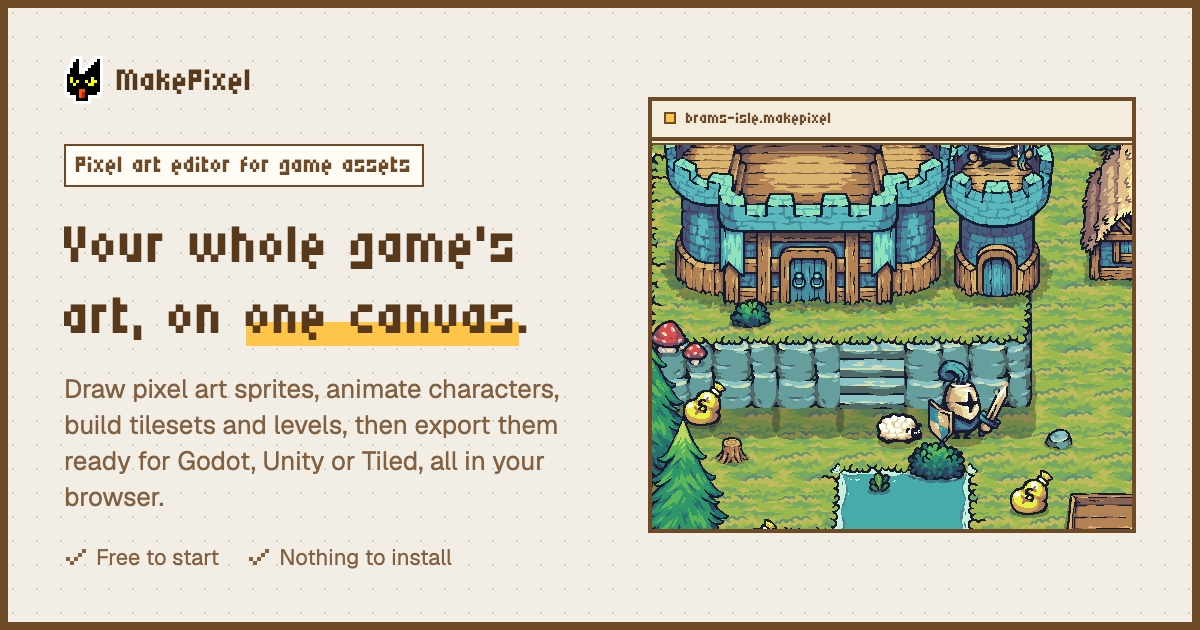
MakePixel is a browser-based pixel art editor for game assets, with AI pixel art generation and an AI agent built in. It lets you draw sprites, animate characters and build tilesets and levels on one canvas, then export them ready for game engines.
Instead of opening one file at a time, every sprite, animation, tileset and note sits side by side on a shared canvas of up to 5,000 items per project, with sections, sticky notes, an outline with search and Figma-style shortcuts.
The drawing tools are grouped and keyed the way Aseprite does it, with 19 tools, 500 steps of undo, pixel-perfect strokes, X and Y symmetry, outline, replace colour and HSV adjustments previewed live, 47 autotiles worked out from 13 painted tiles and 34 classic palettes.
The AI features let you describe characters, items, buildings or whole scenes in three styles and get editable pixel art for one credit per picture. An agent can also work on your canvas from requests in any language, proposing new art with its price, editing existing work, adding notes and sections, with one-click undo.
Linked assets let you save a sprite to a library and reuse it across projects, so editing the original updates every copy. You can import .aseprite files with layers and tags, and turn any picture into pixel art.
It exports to Godot 4, Unity, Aseprite, Tiled, Phaser, PixiJS and GameMaker. MakePixel also works as an MCP server, so coding agents such as Claude Code, Cursor, Codex, VS Code, Windsurf, Gemini CLI and Cline can read the canvas.
Pricing: the Free plan includes every drawing and animation tool, tilesets, characters and scenes, linked assets, all import and export formats and 50 MB of storage. Pro adds 10 GB of storage, version history, scene playtesting, the AI coding tools connection, custom brushes, unlimited palettes, priority support and 30 AI credits each month.
It runs in the browser on desktop, tablet and phone, works offline and suits indie game developers, pixel artists and small studios.
Popular alternatives to MakePixel include Magnific (formerly Freepik AI), Artflow and GenYOU. Compare their pricing and what each is best for below.
| Tool | Pricing | Best for |
|---|---|---|
| Magnific (formerly Freepik AI) | Freemium | Designers, marketers and content teams who want image, video, audio and stock assets from one credit-based creative plat... |
| Artflow | Free Trial | Content creators and storytellers who want AI photos and videos of themselves or custom characters without a photoshoot. |
| GenYOU | Freemium | Social media users and creators who want styled AI portraits and profile photos of themselves from a phone. |
| Lucidpic | Freemium | Marketers and content creators who need AI-generated people, product shots and short clips without booking a photo shoot... |
| Adobe Firefly | Freemium | Designers, video editors and marketing teams who want image, video and audio generation inside Adobe's ecosystem. |
Own MakePixel? Add this badge to your website.

Leave a review for the community
No Review Found











Already a member? The same buttons sign you in.
We'll email you a 6-digit code. No password needed. By continuing you agree to our Privacy Policy.
We sent a 6-digit code to . It expires in 10 minutes.
No email? Check your spam folder, or ·

