
Contact for pricing
Added on Nov 20,2026
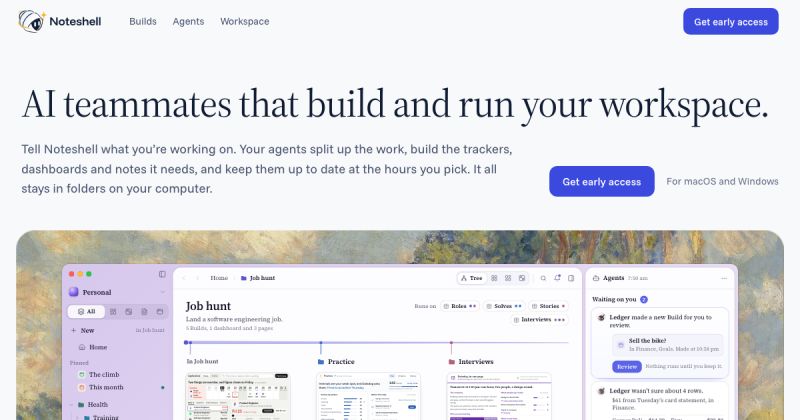
Noteshell is an AI workspace app for Mac in which a team of AI agents builds and maintains the trackers, dashboards, notes and plans you need for a goal.
You tell Noteshell what you are working on, such as a job hunt, a training plan or a research project. The agents split up the work, create the materials the goal needs and keep them up to date at the hours you choose.
Agents can produce plans, documents, reports and small apps you can type into. Noteshell's own agent, Curio, works alongside other named teammates that each look after an area, for example finding job roles, planning meals, adjusting a running schedule or tracking finances.
Everything lives in one connected workspace, so when one agent adds something, related trackers, dashboards and weekly plans pick it up. A canvas view shows the whole workspace in one place, and dashboards update themselves.
It can bring in data from GitHub, Google, Notion and Slack. Accounts are connected through settings on your computer, and Noteshell writes the selected data as plain files in the workspace folder for your builds and agents to read.
Noteshell runs on the AI plan you already have. You can connect a Claude or ChatGPT subscription, add your own keys for Gemini, Grok or other models, or use Noteshell's own models with a monthly allowance. You can choose which model each agent uses.
Every change an agent makes can be undone, new builds wait for your review, and your files stay in folders on your computer. It requires a Mac with Apple silicon and macOS 12 or later.
Pricing: Noteshell is currently offered as early access and the site does not list prices.
It is suited to individuals who want AI help organising personal and work goals, such as job seekers, students and people managing training or finances.
By the PowerfulAI.tools Editorial Team · Updated 21 November 2026 · Researched with AI assistance and checked against the official Noteshell website · How we review tools
Noteshell is in beta with early access by invitation. It runs on your own Claude or ChatGPT plan or a pay-as-you-go API key, and limited 1-week trials are offered on request. Check the official pricing page for current prices.
Pricing checked against the official Noteshell website in November 2026. Prices can change, so confirm before you buy.
Mac users working towards a personal or work goal, such as a job hunt or product launch, who want AI agents to build and maintain the plans and trackers for it.
Everything stays in folders on your computer. Data from connected accounts is written as plain files in the workspace folder .noteshell/data.
Noteshell offers limited 1-week trials during its early stage, reviewed request by request. Until then it works with your own Claude or ChatGPT plan or a pay-as-you-go API key.
Popular alternatives to Noteshell include Voilà, Hiding AI and Loopa. Compare their pricing and what each is best for below.
| Tool | Pricing | Best for |
|---|---|---|
| Voilà | Freemium | Professionals who read and write a lot online and want an AI assistant for email, summaries and rewrites inside the brow... |
| Hiding AI | Free Trial | Job seekers and remote workers who want discreet AI notes, transcripts and answers on their desktop during video calls. |
| Loopa | Freemium | Busy professionals and founders who want to hand everyday tasks to AI agents from one place. |
| SaveDay | Freemium | Researchers, students and heavy readers who save lots of articles and videos and want to find them later by describing w... |
| Flowith | Freemium | Creators and knowledge workers who prefer a visual canvas over a linear chat for working with several AI models. |
Own Noteshell? Add this badge to your website.

Leave a review for the community
No Review Found












Already a member? The same buttons sign you in.
We'll email you a 6-digit code. No password needed. By continuing you agree to our Privacy Policy.
We sent a 6-digit code to . It expires in 10 minutes.
No email? Check your spam folder, or ·

