Paid
Added on Nov 11,2026
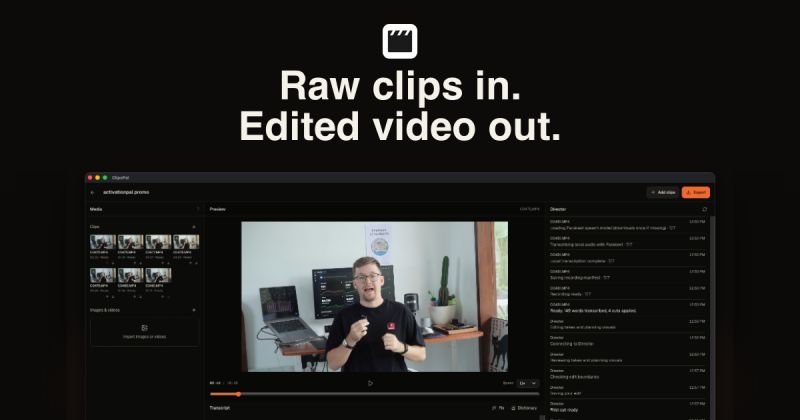
ClipsPal is an AI-powered desktop video editor for Mac and Windows that edits talking-head and faceless videos for you. You import your clips, or record your voice or screen, and the app produces a first edit in one click.
The auto edit cuts failed takes and silences, then adds zoom-ins, subtitles, visuals and sound effects. The site gives an example where 15:35 of raw footage was cut down to a 5:40 video.
It also creates motion slides from the transcript, and can turn a finished video into vertical shorts, a written article, YouTube chapters and thumbnails.
A full manual editor is included, so you can drag, trim and split clips, restore any cut, fix words in the transcript and subtitles, and export MP4 files with burnt-in subtitles or SRT files. Subtitles are available in 40 languages.
The Director feature lets you ask for changes in plain words, with commands for cutting passages, suggesting visuals, adding zooms and sounds, fixing subtitles and making one to five shorts. ClipsPal also ships with an MCP server of 23 tools, so AI agents such as Claude Code, Codex, Cursor, Windsurf and Claude Desktop can read, cut, summarise and export your videos.
Rather than charging for its own AI, ClipsPal runs on the AI you already use, including Claude Code, Codex, OpenCode, Gemini, Cursor, Grok or a local model. Video and audio stay on your computer, transcription runs locally, and only the transcript is sent to your chosen AI, or nothing at all if you pick a local model.
Edits can be opened as a timeline in Premiere Pro or DaVinci Resolve for final touches.
Pricing: ClipsPal is sold as a one-time lifetime licence with no subscription, covering updates and two computers per licence. The site currently lists it at $59 and states the price rises as more licences are sold. It needs macOS 14 or later (Apple Silicon or Intel) or Windows 11 x64, with the Windows version in beta.
It is suited to creators, founders, app makers, course creators and marketers who record talking-head or screen videos and want to cut editing time while keeping their footage private.
By the PowerfulAI.tools Editorial Team · Updated 11 November 2026 · Researched with AI assistance and checked against the official ClipsPal website · How we review tools
A lifetime licence costs $59 as a one-time payment, with the price rising $10 for every 20 licences sold.
Pricing checked against the official ClipsPal website in November 2026. Prices can change, so confirm before you buy.
Creators making talking-head or faceless videos who want AI to do the rough cut, subtitles and short-form clips on their own computer.
No. Video and audio stay on your computer, transcription runs locally and only the transcript goes to your chosen AI; with the local model nothing leaves the computer.
It works with Claude Code, Codex, OpenCode, Gemini, Cursor, Grok or a free local model that ClipsPal downloads, and nothing is billed per video.
Popular alternatives to ClipsPal include Descript, Quso.ai and ClipMaker. Compare their pricing and what each is best for below.
| Tool | Pricing | Best for |
|---|---|---|
| Descript | Freemium | Podcasters, YouTubers and marketing teams who record, edit, caption and repurpose video and audio through a transcript-b... |
| Quso.ai | Freemium | Podcasters, YouTubers and marketers who repurpose long recordings into a steady stream of short social clips. |
| ClipMaker | Freemium | YouTubers who want to repurpose long videos as short clips for TikTok and Instagram on a schedule. |
| Gling | Freemium | YouTubers and talking-head creators who want a rough cut done automatically before finishing in their usual editor. |
| Minvo | Free | Podcasters and video creators who repurpose long recordings into short clips, quote images and written posts. |
Own ClipsPal? Add this badge to your website.

Leave a review for the community
No Review Found