
Paid
Added on Nov 29,2026
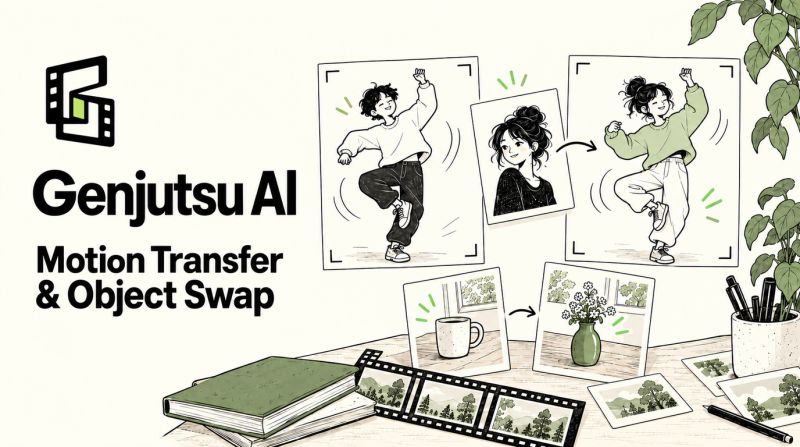
Genjutsu AI is an AI video editing tool that recasts existing footage using reference images. It keeps the original motion, camera movement and timing of a clip and changes the characters, outfits, products or objects in it.
Users upload a source video in MP4 or MOV format, between 4 and 30 seconds long and up to 100 MB, then add one or more reference images in JPG, PNG, WebP or BMP. Optional instructions can be added, and output can be generated at 480P, 720P or 1080P.
There are two modes. Motion Transfer rebuilds the whole video around the original movement, so new characters or a new look follow the same performance and camera. Object Swap changes only one target, such as a person, outfit or product, and keeps the background and camera as close to the source as possible.
Key features include AI character swap, group swaps, outfit changes, product swaps, pet and sports clips, and a community gallery of motions that can be recreated with your own references. The site recommends one person per photo for the most reliable swaps.
Videos generated with credits have no watermark. Every new account gets one free watermarked preview of the first 5 seconds of a video at 1080P.
Pricing: Genjutsu AI uses one-time credit packs rather than a subscription, and credits never expire. Packs range from a USD 4.99 trial pack with 400 credits to Starter at USD 14.99, Pro at USD 29.99 and Max at USD 59.99 with 7,200 credits.
It is suited to content creators, marketers and small teams who want to remake trending clips, test products or outfits in video, or place their own characters into existing footage without filming again.
Popular alternatives to Genjutsu AI include Descript, Quso.ai and ClipMaker. Compare their pricing and what each is best for below.
| Tool | Pricing | Best for |
|---|---|---|
| Descript | Freemium | Podcasters, YouTubers and marketing teams who record, edit, caption and repurpose video and audio through a transcript-b... |
| Quso.ai | Freemium | Podcasters, YouTubers and marketers who repurpose long recordings into a steady stream of short social clips. |
| ClipMaker | Freemium | YouTubers who want to repurpose long videos as short clips for TikTok and Instagram on a schedule. |
| Gling | Freemium | YouTubers and talking-head creators who want a rough cut done automatically before finishing in their usual editor. |
| Minvo | Free | Podcasters and video creators who repurpose long recordings into short clips, quote images and written posts. |
Own Genjutsu AI? Add this badge to your website.

Leave a review for the community
No Review Found


















Already a member? The same buttons sign you in.
We'll email you a 6-digit code. No password needed. By continuing you agree to our Privacy Policy.
We sent a 6-digit code to . It expires in 10 minutes.
No email? Check your spam folder, or ·

