
Freemium
Added on Nov 28,2026
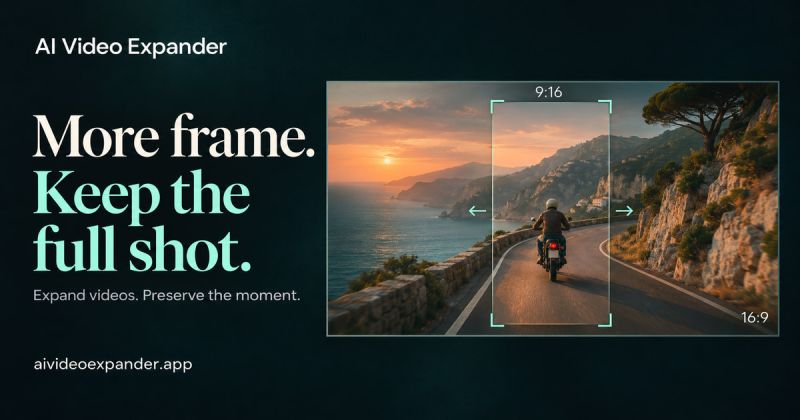
AI Video Expander is an AI video outpainting tool that changes a clip's aspect ratio by generating new scene space around the footage instead of cropping it or adding black bars.
Users upload a clip, choose a new framing such as 9:16, 4:5, 1:1 or 16:9, and can add an optional prompt. The tool then extends the canvas while keeping the original subject in view.
It can turn vertical video into landscape for YouTube or a website, and landscape video into portrait for Reels, TikTok and Shorts. An expansion slider can also add room on all sides while keeping the source ratio.
Common uses include making space for captions, headlines, logos and calls to action, giving tightly framed shots more background, and reformatting product, travel and AI-generated clips for different placements.
Downloads are MP4 files that keep the original audio. Text, logos and subtitles are added afterwards in the user's own editor. Users can preview the framing on the homepage and review the generated detail and motion before downloading.
Pricing: one clip of up to 10 seconds can be expanded free with no account. Paid options use credits at 1 credit per second of source video: a one-time 240-credit pack costs US$9.90, and monthly plans are Basic (US$19.90, 660 credits), Pro (US$39.90, 1,600 credits) and Max (US$79.90, 4,000 credits), with yearly billing saving 17%.
It is suited to social media creators, marketers and video editors who need to repurpose clips across platforms without losing parts of the shot.
Popular alternatives to AI Video Expander include Descript, Quso.ai and ClipMaker. Compare their pricing and what each is best for below.
| Tool | Pricing | Best for |
|---|---|---|
| Descript | Freemium | Podcasters, YouTubers and marketing teams who record, edit, caption and repurpose video and audio through a transcript-b... |
| Quso.ai | Freemium | Podcasters, YouTubers and marketers who repurpose long recordings into a steady stream of short social clips. |
| ClipMaker | Freemium | YouTubers who want to repurpose long videos as short clips for TikTok and Instagram on a schedule. |
| Gling | Freemium | YouTubers and talking-head creators who want a rough cut done automatically before finishing in their usual editor. |
| Minvo | Free | Podcasters and video creators who repurpose long recordings into short clips, quote images and written posts. |
Own AI Video Expander? Add this badge to your website.

Leave a review for the community
No Review Found



















Already a member? The same buttons sign you in.
We'll email you a 6-digit code. No password needed. By continuing you agree to our Privacy Policy.
We sent a 6-digit code to . It expires in 10 minutes.
No email? Check your spam folder, or ·

