
Paid
Added on Nov 17,2026
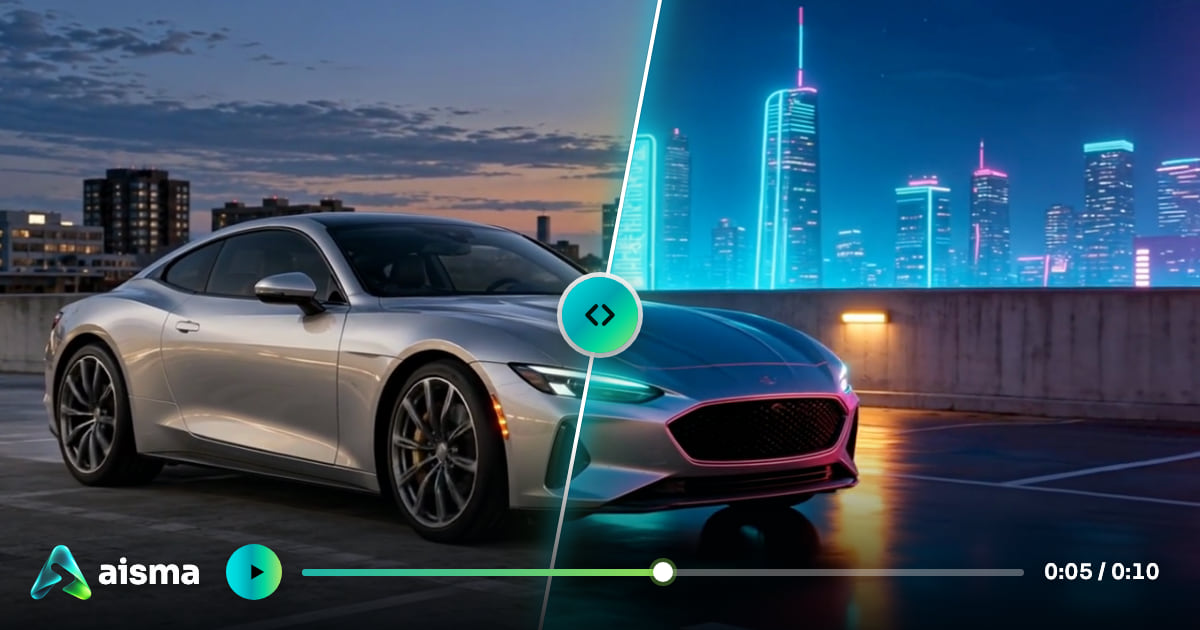
Aisma is an AI video editor that changes what is in a video you have already filmed. You upload a clip, describe the change in plain words, and Aisma edits inside the shot while keeping your framing, motion and original audio.
Clips can be between 2 and 60 seconds long and up to 500 MB, in MP4 or MOV, from tall vertical to wide horizontal. You can add up to 10 reference photos per edit for a specific face, garment or product. Results are saved as MP4 in 720p or 1080p.
Key edit types include removing objects and people from video, changing clothes, changing the background, swapping a product, swapping a face, restyling the whole look of a clip, adding effects, and free-form edits from your own request.
Editing works in three steps: upload a clip, describe the change, then see the credit price and generate. The exact price is shown on the Generate button before anything renders, and edits usually take a few minutes.
Unused credits are returned, and a part that fails or does not pass the automatic safety check is not charged. Edited clips are kept in a private library in the browser and the apps, which are available for iPhone and Android.
Pricing: Aisma is paid with credits. An edit costs 10 credits per second at 720p or 20 credits per second at 1080p. Credits come in one-time packs from $1.99 that never expire, or weekly plans from $9.99. New web accounts can prepare their first three edits before buying credits, but rendering requires credits.
It is suited to content creators, marketers and small businesses who want to change existing footage, such as removing a photobomber or swapping a product, without reshooting.
By the PowerfulAI.tools Editorial Team · Updated 18 November 2026 · Researched with AI assistance and checked against the official Aisma website · How we review tools
Edits cost 10 credits per second at 720p or 20 at 1080p; credit packs run from $1.99 for 100 credits to $99.99 for 9,000, and weekly plans from $9.99 for 1,000 credits a week.
Pricing checked against the official Aisma website in November 2026. Prices can change, so confirm before you buy.
Small business owners and content creators who need to fix or restyle existing short video clips, such as removing a photobomber or swapping a product, without reshooting.
Yes. Aisma runs on the web and in iPhone and Android apps, which are free to download, and your private Library is available across them. App subscriptions are managed through the App Store or Google Play.
The credit price is reserved when you press Generate, and anything unused goes back to your balance. A part that fails or does not pass the automatic safety check is not charged.
Yes, by adding two clear portraits. Aisma asks that you only use photos of people who have agreed to it, and you should also check local laws on impersonation and likeness before publishing.
Popular alternatives to Aisma include Descript, Quso.ai and ClipMaker. Compare their pricing and what each is best for below.
| Tool | Pricing | Best for |
|---|---|---|
| Descript | Freemium | Podcasters, YouTubers and marketing teams who record, edit, caption and repurpose video and audio through a transcript-b... |
| Quso.ai | Freemium | Podcasters, YouTubers and marketers who repurpose long recordings into a steady stream of short social clips. |
| ClipMaker | Freemium | YouTubers who want to repurpose long videos as short clips for TikTok and Instagram on a schedule. |
| Gling | Freemium | YouTubers and talking-head creators who want a rough cut done automatically before finishing in their usual editor. |
| Minvo | Free | Podcasters and video creators who repurpose long recordings into short clips, quote images and written posts. |
Own Aisma? Add this badge to your website.

Leave a review for the community
No Review Found










Already a member? The same buttons sign you in.
We'll email you a 6-digit code. No password needed. By continuing you agree to our Privacy Policy.
We sent a 6-digit code to . It expires in 10 minutes.
No email? Check your spam folder, or ·

