Free Trial
Added on Oct 25,2026
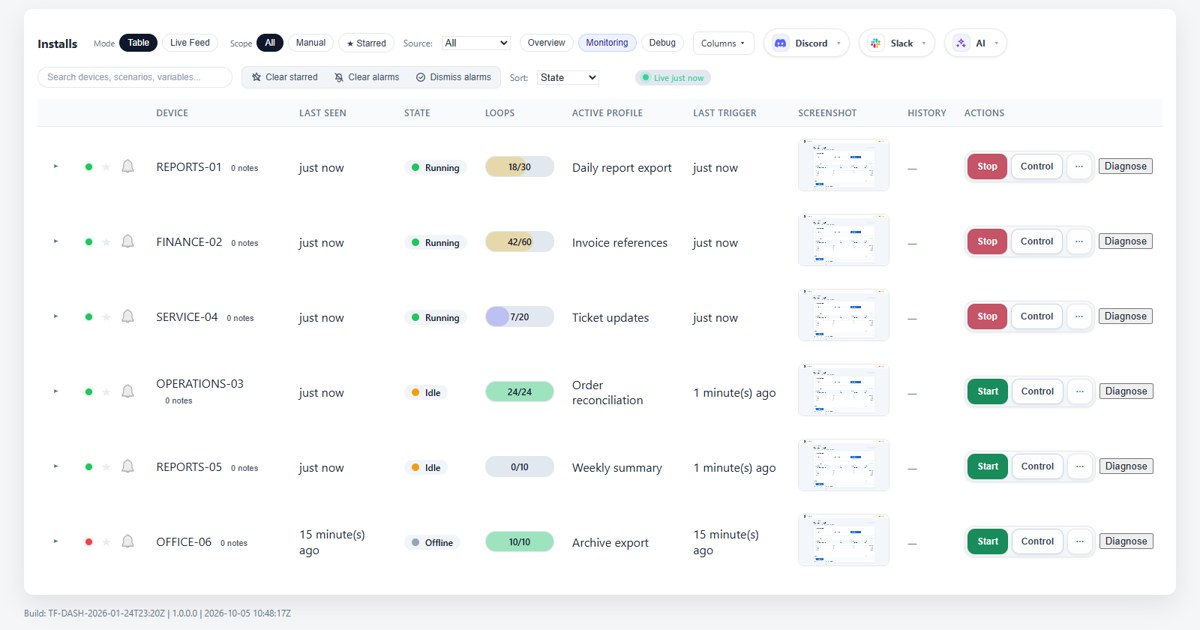
TriggerFlow is a Windows automation and remote management tool that automates desktop and legacy Windows software by reading the screen, so it does not need an API. It is run by MJP Tech Ltd in Pembrokeshire, Wales.
Workflows react to what is on screen using image matching, OCR, window checks and keyboard and mouse input, rather than fixed coordinates. You can build them by recording, with a visual editor or with ChatGPT, and no code is required.
A beta integration lets you connect ChatGPT or Codex to a Windows PC and describe a task. The AI works through the screen step by step, then saves the process as a profile, which TriggerFlow tests on the real PC before installing only the version that passed. Saved profiles using standard actions run locally with no AI model calls.
Key features include supervised testing before deployment, locked approved versions, stop rules, bounded retries, scheduling by interval or calendar, and queued profiles.
A dashboard shows device state, active workflows, live screenshots, last-seen times and run history, with remote start and stop and a screen viewer for clicking and typing on a device.
Security features include two-factor sign-in, per-device control grants, instant stop, revocable access, signed updates and signed remote commands. The Business tier adds AI-assisted building, AI vision for reading the screen and a credentials vault.
Pricing: plans are charged per device. Starter is 15 pounds a month, Pro is 30 pounds a month and Business is 45 pounds a month, with annual billing giving two months free. A 14-day trial of Pro on up to 5 devices is available with no card required.
It is suited to automation consultants, managed service providers, IT teams and agencies that run repetitive tasks in legacy Windows software, such as report exports and data entry between programs.
Similar tools to compare with TriggerFlow:
| Tool | Pricing | Best for |
|---|---|---|
| Voilà | Freemium | Professionals who read and write a lot online and want an AI assistant for email, summaries and rewrites inside the brow... |
| Hiding AI | Free Trial | Job seekers and remote workers who want discreet AI notes, transcripts and answers on their desktop during video calls. |
| Flowith | Freemium | Creators and knowledge workers who prefer a visual canvas over a linear chat for working with several AI models. |
| NotebookLM | Freemium | Researchers, students and analysts who want to question and summarise a set of their own sources. |
| Riffo | Free | Anyone with cluttered Downloads or Desktop folders who wants screenshots, PDFs and exports renamed and sorted automatica... |
Own TriggerFlow? Add this badge to your website.

Leave a review for the community
No Review Found